Introduction
ACF (Application Component Framework) is a comprehensive C++ based, cross-platform component framework that was especially designed for creation of complex, customizable and highly scalable applications. The framework provides a robust foundation for building industrial-strength software systems with emphasis on modularity, reusability, and maintainability.
Key Principles
ACF follows the component-oriented programming paradigm and provides instruments to build software from reusable, loosely-coupled components. The framework serves well-defined interfaces and concepts to create those components with the following core principles:
- Separation of Concerns: Clear boundaries between business logic, data model, and presentation layer
- Interface-Based Communication: Components interact exclusively through well-defined interfaces
- Dependency Injection: Automatic resolution and injection of component dependencies
- Design Pattern Implementation: Built-in support for common patterns (Factory, Observer, Serialization, etc.)
- Type Safety: Strong typing throughout the framework with compile-time checking where possible
- Cross-Platform Support: Runs on Windows, Linux, and macOS
Technical Foundation
ACF contains a set of libraries with implementations of most useful design patterns:
- Serialization: Archive-based persistence with multiple backend support (XML, JSON, Binary)
- Model/Observer: Sophisticated change notification and data binding mechanisms
- Factory Pattern: Dynamic component instantiation with registry system
- Dependency Injection: Automatic dependency resolution and lifecycle management
- Document/View Architecture: Complete MDI/SDI application framework
- Parameter Management: Type-safe parameter handling with GUI integration
The UI-part of the framework is based on Qt library provided by Qt Company, providing native look-and-feel across platforms and extensive widget support.
ACF implements a powerful component concept and includes many well-designed components, which you can directly use in your application, significantly reducing development time and improving code quality.
ACF is open source and released under the terms of the GNU Lesser General Public License (LGPL), allowing use in both open source and commercial applications.
Theoretical Background
More theoretical considerations about component-based development can be found at:
- Component-Based Software Engineering: http://en.wikipedia.org/wiki/Component-based_software_engineering
- Dependency Injection: http://en.wikipedia.org/wiki/Dependency_injection
- Model-View-Controller: http://en.wikipedia.org/wiki/Model%E2%80%93view%E2%80%93controller
How ACF Works
Component Architecture
The main idea behind ACF is to see each software product as a composition of components with clearly defined interfaces. Interface-based communication ensures loose coupling and high testability.
Interface is the only way for communication between components, which provides:
- Clear API contracts between components
- Easy mocking for unit tests
- Runtime component replacement (plugin architecture)
- Version compatibility through interface stability
Implementing Components
The typical workflow to implement an ACF component involves:
1. Define the Interface
A C++ pure virtual interface must be defined, inheriting from istd::IPolymorphic (or a derived interface like iser::ISerializable):
Note: You typically don't inherit from icomp::IComponent directly - it's an internal framework interface. Use istd::IPolymorphic or iser::ISerializable as the base.
2. Implement the Component Class
Create a class that implements this interface. There are several approaches:
a) Basic Component Implementation:
b) Component with References (Dependencies):
Components can declare references to other components for dependency injection:
c) Component with Attributes:
Attributes allow configuration of component behavior:
3. Register in a Package
After implementation, components must be registered in a Package. Packages are logical containers that group related components:
Package Types:
- C++ Packages (DLL/Shared Library): For compiled C++ components with special export interface
- Composition Packages (ARX files): For visual component compositions created with ACF Compositor
All packages use the extension .ARP (ACF Registry Package) for consistency.
Component Composition
Components can be combined into larger components:
ACF Compositor Tool:
- Graphical editor for component dependencies and attributes
- UML-like visualization of component structure
- Visual connection of component references
- Attribute configuration through property editors
- Export to ARX files (registry format)
Application Execution
There are two deployment strategies:
1. Runtime Execution (Prototyping):
- Component compositions run directly by Framework-Runtime
- Dynamic loading of component packages
- Useful for rapid prototyping and testing
- Hot-swapping of components during development
2. Compiled Execution (Production):
- ACF provides ARX Compiler (ARXC) - a source code generator
- Converts component compositions to native C++ code
- Resulting code is compiled normally
- Advantages:
- No runtime DLL loading overhead
- Better performance
- Reduced deployment complexity
- Static linking possible
- Better optimization by compiler
Development Workflow Summary
- Design: Define interfaces and component contracts
- Implement: Create component classes with dependencies and attributes
- Compose: Use ACF Compositor to create component compositions
- Test: Run with Framework-Runtime for rapid testing
- Compile: Generate C++ code with ARX Compiler
- Deploy: Build and distribute optimized executable
Key Features and Capabilities
ACF provides a comprehensive set of features for enterprise-grade application development:
Architectural Features
1. Component Framework (icomp)
- Component model with lifecycle management
- Interface-based programming with IComponent base
- Component registry and factory system
- Automatic dependency injection and resolution
- Attribute system for component configuration
- Component composition and aggregation
- Plugin architecture with dynamic loading
- Type-safe component casting and querying
2. Graphical Component Editing
- ACF Compositor: Visual UML-like component editor
- Drag-and-drop component composition
- Visual dependency wiring
- Property editing with live preview
- Export to ARX (ACF Registry XML) format
- Validation and error checking
3. Code Generation
- ARX Compiler (ARXC): Component composition to C++ converter
- Generates efficient, readable C++ code
- Preserves component structure and dependencies
- Enables static linking and optimization
- Reduces runtime overhead
- Facilitates debugging with source-level access
Data Management Features
4. Type-Safe Parameter Management (iprm)
- Strongly typed parameter interfaces
- Runtime type checking and validation
- Parameter grouping and hierarchies
- Default values and constraints
- Change notification integration
- GUI auto-generation support
- Serialization support for all parameter types
5. Comprehensive Serialization (iser)
- Archive-based abstraction layer
- Multiple format support:
- Binary archives for performance
- XML (simple and compact) for interoperability
- JSON for web integration
- Memory archives for networking
- Bitwise archives for compression
- Extensible architecture for custom formats
- Support for complex object graphs
- Version compatibility mechanisms
6. Document Management (idoc, iqtdoc)
- Template-based document framework
- Full undo/redo support with command pattern
- Multiple document interface (MDI) support
- Single document interface (SDI) support
- Document import/export with multiple formats
- Print preview and printing support
- Recent files management
- Auto-save functionality
User Interface Features
7. Qt Integration (iqtgui, iqtprm)
- Native Qt widget integration
- Automatic UI generation from parameters
- Custom widget library (iwidgets)
- Drag-and-drop support
- Docking and toolbar management
- Splash screens and progress dialogs
- Designer plugin support
- Style sheet support
8. 2D/3D Graphics (i2d, i3d, iview)
- Geometric primitives (points, lines, polygons, curves)
- Transformations (translation, rotation, scaling)
- Calibration support for real-world measurements
- Interactive shapes with selection and manipulation
- Calibrated views with zoom and pan
- 3D transformations and projections
- OpenGL integration support
Development Support Features
9. Testing Framework (itest)
- Qt Test-based unit testing
- Component testing utilities
- Mock component support
- Test data management
- Automated test discovery
- Performance benchmarking
- Code coverage integration
10. Logging System (ilog, iloggui)
- Multi-level logging (Debug, Info, Warning, Error)
- Multiple output targets (console, file, GUI)
- Thread-safe logging
- Structured log messages
- Log filtering and search
- GUI log viewer with color coding
- Export functionality
11. File Handling (ifile, ifilegui)
- Generic file loading/saving interface
- Format auto-detection
- File dialogs with preview
- Recent files tracking
- Path management utilities
- Auto-persistence support
- File watchers for change detection
Integration Features
12. Third-Party Library Wrappers
ACF provides component wrappers for popular libraries:
- Boost: Smart pointers, algorithms, utilities
- MongoDB: NoSQL database integration
- PostgreSQL: Relational database support
- Qwt: Scientific plotting and graphing
- Qwt3D: 3D surface plotting
- OpenCV: Computer vision and image processing
- Phonon: Multimedia playback
- FFmpeg: Video encoding/decoding
- zlib: Compression
- QScintilla: Source code editing
13. Package Management (ipackage)
- Dynamic package loading
- Plugin discovery and enumeration
- Package dependencies management
- Version compatibility checking
- Package metadata and descriptions
- Hot-reloading support (development mode)
Advanced Features
14. Model/Observer Pattern (imod)
- Sophisticated change notification
- Hierarchical model support
- Selective observation (filter by change type)
- Automatic observer lifecycle management
- Multi-threaded observer support
- Change delegation chains
15. Color Management (icmm)
- Multiple color models (RGB, HSV, CMYK, Lab)
- Color space conversions
- Color interpolation
- Palette management
- Color calibration support
16. Mathematical Utilities (imath)
- Interpolation algorithms (linear, spline, polynomial)
- Complex number operations
- Numerical algorithms
- Statistical functions
- Matrix operations
- Curve fitting
Image Processing Features
17. Imaging Components (iimg)
- Bitmap handling and manipulation
- Multiple format support (PNG, JPEG, BMP, TIFF)
- Color space conversions
- Filtering and transformations
- ROI (Region of Interest) support
- Histogram operations
- Image metadata handling
ACF Libraries Reference
ACF is organized into focused, cohesive libraries that can be used independently or together. Each library provides detailed documentation with examples and best practices.
Core Foundation Libraries
These libraries form the foundation of the framework:
- Foundational utilities and interfaces (change notification, smart pointers, utilities)
- Key interfaces: istd::IChangeable, istd::ICloneable
- Smart pointers: istd::TUniqueInterfacePtr, istd::TSharedInterfacePtr
- RAII helpers: istd::CChangeNotifier, istd::CChangeGroup
- See istd - Standard Utilities Library for detailed documentation and examples
- Comprehensive component-based architecture with dependency injection
- Core interfaces: icomp::IComponent, icomp::IRegistry, icomp::IComponentFactory
- Attribute system for component configuration
- Automatic dependency resolution and lifecycle management
- See icomp - Component Framework for complete guide
iser - Serialization Framework
- Archive-based object persistence with multiple format support
- Archive types: Binary, XML, JSON, Memory, File-based
- Interfaces: iser::ISerializable, iser::IArchive
- Version management and type identification
- See iser - Serialization Framework for usage examples and best practices
- Type-safe parameter handling with validation and GUI integration
- Parameter types: Text, ID, Name, Selection, Enableable, Variable
- Containers: iprm::IParamsSet, iprm::IParamsManager
- Options and constraints: iprm::IOptionsList, iprm::IOptionsManager
- See iprm - Parameter Management Library for comprehensive examples
Data and Mathematics
imath - Mathematical Utilities
- Numerical algorithms (interpolation, complex numbers, curve fitting)
- Vector and matrix operations
- Statistical functions and numerical solvers
- See imath - Mathematical Utilities Library for details
- 2D geometric primitives (points, lines, polygons, circles)
- Affine transformations and geometric calculations
- Calibration support for real-world measurements
- See i2d - 2D Graphics Utilities Library for comprehensive documentation
- 3D geometric primitives and transformations
- Projection matrices and 3D-to-2D projection
- See i3d - 3D Graphics Utilities Library for details
- Multiple color models (RGB, HSV, CMYK, Lab)
- Color space conversions and interpolation
- Palette management and calibration
- See icmm - Color Management Library for comprehensive guide
Document and View Framework
- Template-based document management with multi-level undo/redo
- Document lifecycle: idoc::IDocument, idoc::IDocumentTemplate
- Multi-document management and persistence
- See idoc - Document Framework for details
- Interactive shapes and calibrated views
- Selection, manipulation, zoom and pan support
- See iview - View Framework for documentation
- Observer pattern for change notification
- Model base classes: imod::IModel, imod::IModelObserver
- Automatic observer management and change filtering
- See imod - Model-Observer Pattern Library for implementation guide
File and Data Handling
- Generic file operations with format auto-detection
- Archive implementations for files (Binary, XML, JSON)
- See ifile - File Handling Library for details
ifilegui - File GUI Components
- Extended file dialogs with preview
- Recent files management and directory browsers
- See ifilegui - File GUI Components for documentation
- Image loading, manipulation and display
- Multiple format support and color space operations
- See iimg - Imaging Library for comprehensive guide
Logging and Testing
- Multi-level logging infrastructure (Debug, Info, Warning, Error)
- Thread-safe logging with multiple output targets
- See ilog - Logging Library for details
- Log viewer widget with color coding
- Filtering and search capabilities
- See iloggui - Logging GUI Components for documentation
- Qt Test-based unit testing support
- Component testing utilities and assertion helpers
- See itest - Testing Framework for testing guide
Qt Framework Integration
- Qt-specific utilities (settings, clipboard, events)
- See iqt - Qt Utilities Library for details
- Qt widgets for 2D geometry parameters
- Interactive geometry editors
- See iqt2d - Qt 2D Graphics Library for documentation
iqtdoc - Qt Document Framework
- Qt-specific document management
- MDI/SDI application framework
- See iqtdoc - Qt Document Framework for comprehensive guide
- Application base classes and main window framework
- Splash screens, progress dialogs, Designer support
- See iqtgui - Qt GUI Utilities Library for details
- Auto-generated parameter editing widgets
- Property browser-style editors with constraint-aware editing
- See iqtprm - Qt Parameter Widgets Library for documentation
- Custom Qt widgets and delegates
- Enhanced standard widgets
- See iwidgets - Widget Utilities Library for details
Infrastructure Libraries
- Metadata and attribute management for components
- See iattr - Attributes Library for details
- Application infrastructure and progress management
- See ibase - Base Components Library for documentation
- Dynamic package and plugin loading
- Dependency resolution and package metadata
- See ipackage - Package Management Library for comprehensive guide
Additional Resources
Tutorials and Examples
- Component Framework Guide: Comprehensive guide to building components (see Docs/ComponentFramework.md)
- Component Examples: Practical implementation examples (see Docs/ComponentFrameworkExamples.md)
- Document/View Framework: Building document-based applications (see Docs/DocumentViewFrameworkREADME.md)
Architecture Guides
- Data Model: Building observable data models with change notification
- Model/Observer Concept: Implementing the observer pattern
- Persistence Concept: Object serialization and file persistence
- Component Concept: Understanding component-based architecture
Application Frameworks
- Application Framework: General application structure
- Document-Based Framework: MDI/SDI applications
- Parameter Management: Parameter-driven applications
Building ACF
Prerequisites
Required Software:
- C++ compiler with C++11 support or later
- Qt Framework (version 5.x or 6.x)
- CMake or qmake build system
- Doxygen (for documentation generation)
Optional Dependencies:
- Boost (for extended functionality)
- OpenCV (for image processing components)
- Qwt/Qwt3D (for plotting components)
- Other third-party libraries as needed
Build Process
ACF uses a standard CMake or qmake build process:
- Configure the environment: Set ACFDIR environment variable to the ACF installation directory
- Generate build files: Use CMake or qmake to generate platform-specific build files
- Build libraries: Build the core libraries in dependency order
- Build applications: Build applications and tools
- Run tests: Execute the test suite to verify the build
Example Build Commands:
Deployment Options
ACF supports multiple deployment strategies:
1. Development Mode:
- Dynamic component loading from DLL/shared libraries
- Runtime composition with ARX files
- Hot-reloading support for rapid iteration
- Use ACF Compositor for visual editing
2. Production Mode:
- Compile component compositions to C++ using ARX Compiler (ARXC)
- Static linking of components into executable
- Optimized performance with compiler optimizations
- Reduced deployment size and complexity
3. Plugin Mode:
- Package components as ARP files (ACF Registry Package)
- Dynamic discovery and loading of plugins
- Extensible application architecture
- Update plugins without recompiling main application
Getting Started
Quick Start Guide
1. Define an Interface
2. Implement a Component
3. Register and Use
Components are registered in package registration files and accessed through the component registry:
Learning Resources
- Start with istd - Standard Utilities Library for understanding change notification
- Learn icomp - Component Framework for component architecture
- Study iser - Serialization Framework for object persistence
- Explore iprm - Parameter Management Library for parameter management
- Read the complete Component Framework guide (Docs/ComponentFramework.md)
Design Patterns in ACF
ACF implements many proven design patterns:
Creational Patterns:
- Factory Pattern: icomp::IComponentFactory for dynamic component creation
- Abstract Factory: Component families through package system
- Singleton: Registry and environment management
- Builder: Component composition with ACF Compositor
Structural Patterns:
- Composite: Hierarchical component composition (core concept)
- Proxy: imod::CModelProxy for delegation
- Adapter: Archive adapters for different formats
- Facade: High-level library interfaces
Behavioral Patterns:
- Observer: istd::IChangeable and imod::IModelObserver
- Strategy: Interface-based component implementations
- Command: Undo/redo in document framework
- Template Method: Component lifecycle hooks
Best Practices and Guidelines
Component Design
- Interface Segregation: Define focused, single-purpose interfaces
- Dependency Injection: Use references for component dependencies
- Immutable IDs: Component IDs should not change after creation
- Loose Coupling: Communicate only through interfaces
- Composition Over Inheritance: Prefer component composition
Error Handling
- Return Value Checking: Check return values from all operations
- Change Notification Scoping: Use istd::CChangeNotifier for RAII
- Archive Error Handling: Verify archive state after operations
- Validation: Validate parameters and constraints before processing
- Logging: Use ilog for diagnostic information
Performance Considerations
- Lazy Initialization: Components support lazy reference resolution
- Batch Changes: Group related changes with istd::CChangeGroup
- Binary Archives: Use binary archives for performance-critical serialization
- Smart Pointers: Use appropriate smart pointer types to avoid overhead
- Static Linking: Compile compositions for production deployment
Thread Safety
- Most ACF components are not thread-safe by default
- Use Qt's signal/slot mechanism for cross-thread communication
- Use iqtgui::TGuiObserverWrap for GUI updates from worker threads
- Synchronize access to shared components with mutexes
- Consider thread-local component instances for parallel processing
Troubleshooting and FAQ
Common Issues
Q: Component not found in registry
- Verify component is registered with ICOMP_REGISTER_COMPONENT
- Check package is loaded correctly
- Ensure component ID matches in registry and lookup
Q: Dependency injection not working
- Verify reference ID matches target component ID
- Check component hierarchy and scope
- Ensure referenced component is created before referencing component
Q: Serialization fails
- Implement iser::ISerializable correctly
- Check archive is in correct mode (reading/writing)
- Verify Serialize() is symmetric for read/write
- Add version information for compatibility
Q: GUI not updating on model change
- Verify observer is attached to model
- Check change flags are correct
- Use iqtgui::TGuiObserverWrap for thread safety
- Ensure istd::CChangeNotifier is used in setter methods
Q: Memory leaks detected
- Use smart pointers (istd::TUniqueInterfacePtr, TSharedInterfacePtr)
- Check for circular references
- Verify component lifecycle management
- Use memory profiling tools to identify sources
Debug Tips
- Enable Logging: Use ilog with Debug level for detailed information
- Inspect Registry: Use registry traversal to verify component structure
- Test in Isolation: Unit test components separately before integration
- Check Archives: Export to XML to inspect serialized data
- Use Compositor: Visualize component connections graphically
Screenshots and Examples
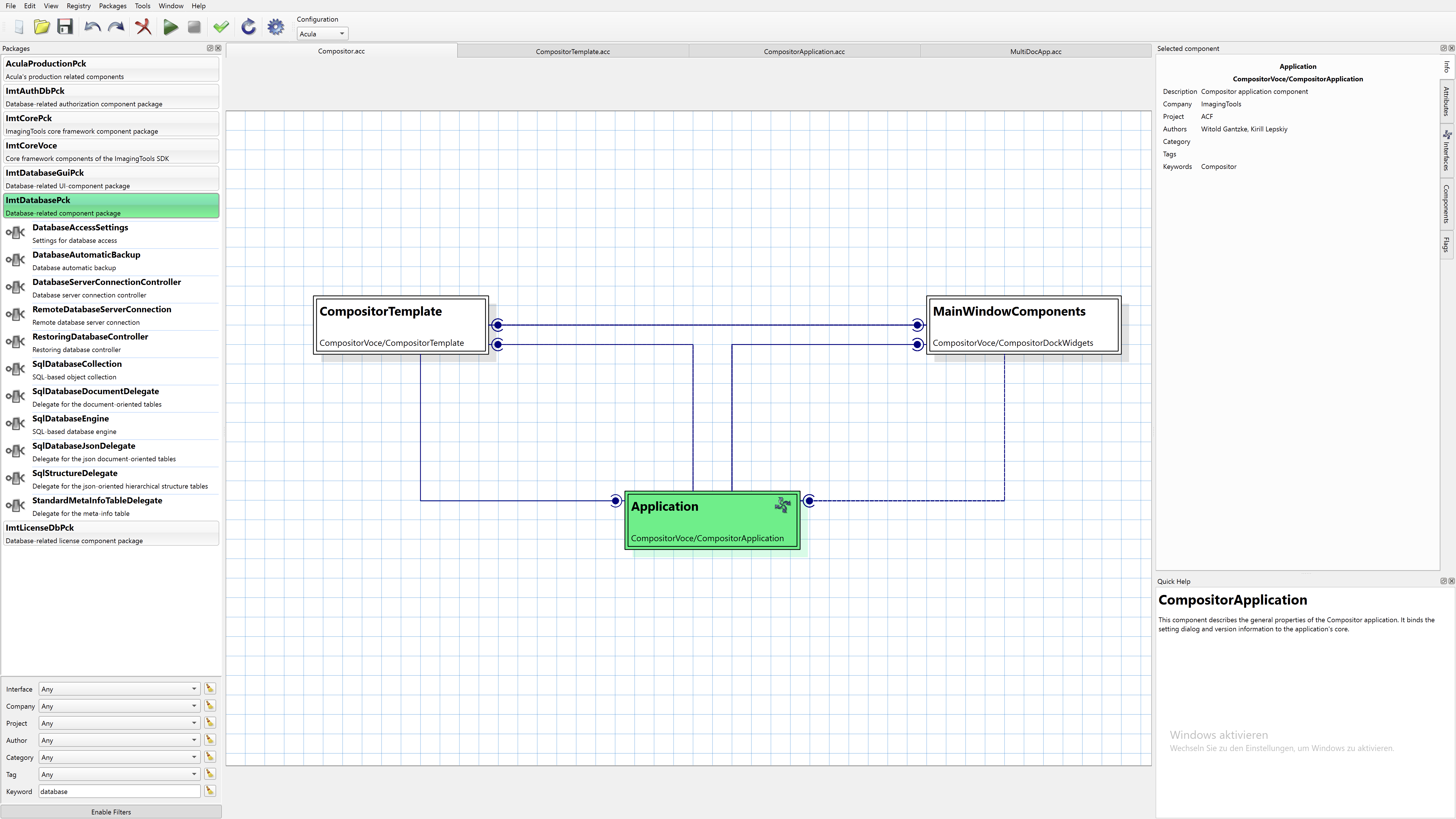
ACF Compositor provides a graphical interface for:
- Creating and editing component compositions
- Visual dependency wiring between components
- Property and attribute configuration
- UML-like component diagrams
- Export to ARX format for runtime or compilation
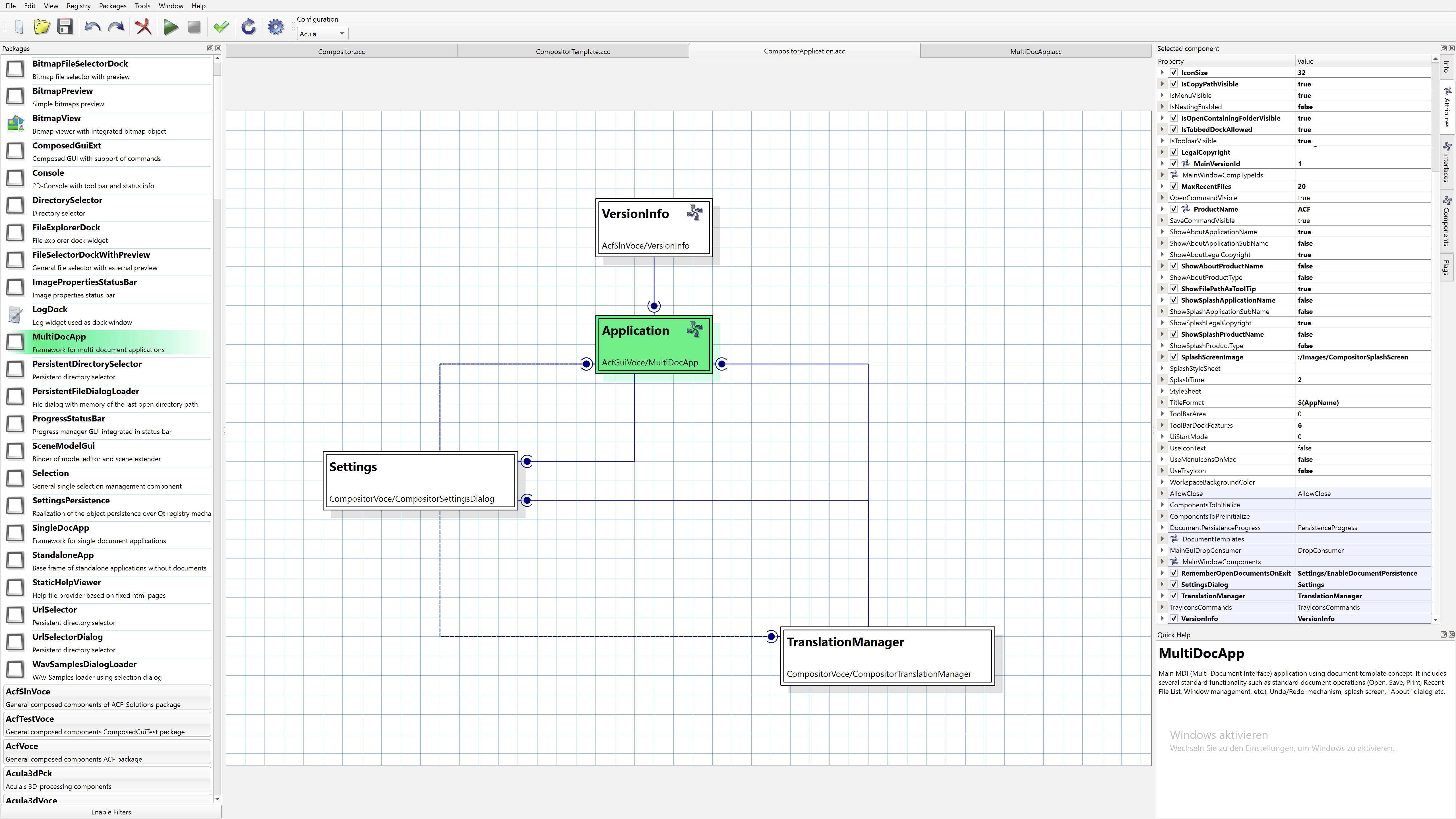
Document Framework example showing:
- Multiple document interface (MDI) with docking windows
- Integrated parameter editing panels
- Log viewer and diagnostic tools
- Menu and toolbar customization
- Full undo/redo support
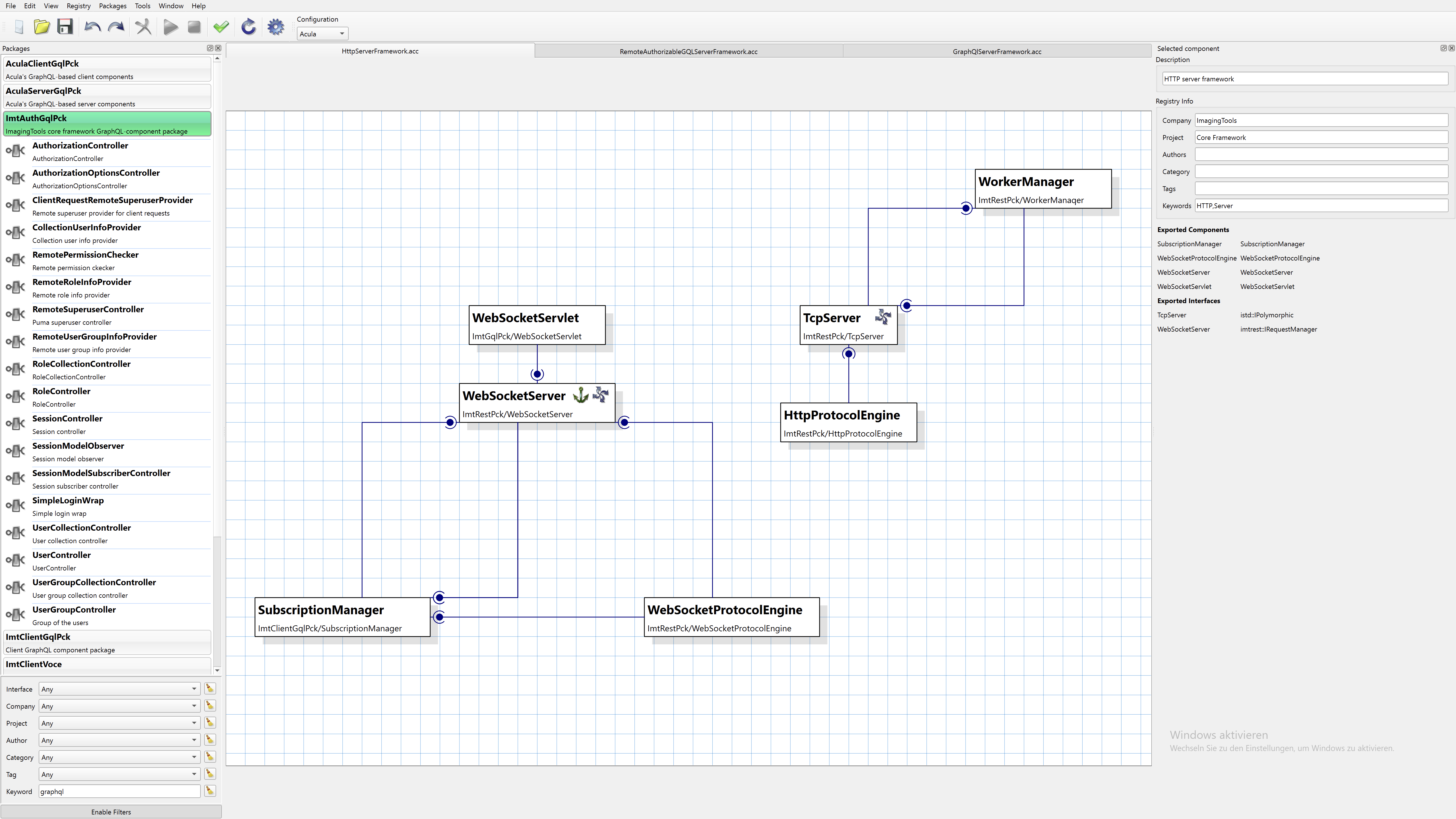
Server Framework demonstrating:
- Component-based server architecture
- RESTful API implementation with components
- Modular request handling
- Extensible service architecture
License and Contributing
License Information
ACF is open source software released under the GNU Lesser General Public License (LGPL).
Key Points:
- Free to use in both open source and commercial applications
- Modifications to ACF itself must be shared under LGPL
- Applications using ACF can be proprietary
- See LGPL directory for complete license text
Contributing to ACF
Contributions are welcome! To contribute:
- Fork the repository on GitHub
- Create a feature branch
- Follow the existing coding conventions
- Add tests for new functionality
- Update documentation as needed
- Submit a pull request
Repository: https://github.com/ImagingTools/Acf
Documentation: https://imagingtools.github.io/Acf/
Support and Contact
- Issues: Report bugs and feature requests on GitHub
- Documentation: Read the comprehensive guides and API reference
- Examples: Study the example code in the repository
- Community: Engage with other developers using ACF