Interface for describing server connection configuration with multi-protocol support. More...
#include <IServerConnectionInterface.h>
Public Types | |
| enum | ProtocolType { PT_UNKNOWN , PT_HTTP , PT_WEBSOCKET , PT_FILE , PT_GRPC } |
| Communication protocols supported by server connections. More... | |
| enum | ConnectionFlags { CF_DEFAULT = 0x1 , CF_SECURE = 0x2 } |
| Flags controlling connection security and behavior. More... | |
| typedef QList< ProtocolType > | ProtocolTypes |
| List of protocol types for querying supported protocols. | |
Public Member Functions | |
| virtual int | GetConnectionFlags () const =0 |
| Get the connection flags determining secure/insecure mode. | |
| virtual void | SetConnectionFlags (int connectionFlags)=0 |
| Set the connection flags to control secure/insecure mode. | |
| virtual QString | GetHost () const =0 |
| Get the server host name or address. | |
| virtual void | SetHost (const QString &host)=0 |
| Set the server host name or address. | |
| virtual int | GetPort (ProtocolType protocol) const =0 |
| Get the port number for a specific protocol. | |
| virtual void | SetPort (ProtocolType protocol, int port)=0 |
| Set the port number for a specific protocol. | |
| virtual ProtocolTypes | GetSupportedProtocols () const =0 |
| Get the list of protocols supported by this connection. | |
| virtual bool | GetUrl (ProtocolType protocol, QUrl &url) const =0 |
| Generate a complete URL for the specified protocol. | |
Detailed Description
Interface for describing server connection configuration with multi-protocol support.
The IServerConnectionInterface defines the contract for configuring server connections across multiple communication protocols. A single server instance can support multiple protocols (HTTP, WebSocket, gRPC, File) on the same host, each on a separate port.
This interface supports both secure (HTTPS/WSS) and insecure (HTTP/WS) connection modes, making it suitable for development, testing, and production deployments.
Key Concepts
Multi-Protocol Support:
- Single host can expose multiple protocols simultaneously
- Each protocol configured with independent port numbers
- Default ports provided by CServerConnectionInterfaceParamComp
- Protocol availability queryable via GetSupportedProtocols()
Connection Modes:
- CF_DEFAULT: Insecure connections (HTTP, WS)
- CF_SECURE: Secure connections with SSL/TLS (HTTPS, WSS)
- Flag-based switching between secure and insecure modes
URL Generation:
- Automatic scheme selection (http/https, ws/wss) based on CF_SECURE flag
- Protocol-specific URL construction via GetUrl()
- Simplifies client configuration
Implementations
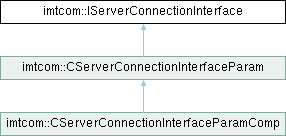
- CServerConnectionInterfaceParam: Basic implementation with port mapping
- CServerConnectionInterfaceParamComp: ACF component with default ports
- HTTP: 9001
- WebSocket: 9000
- gRPC: 50101
Usage Example
Integration Points
Server Components (imtrest):
- CTcpServerComp (HTTP server)
- CWebSocketServerComp (WebSocket server)
- CUdpServerComp (UDP server)
Client Components:
- imtclientgql: GraphQL clients read WebSocket URLs
- imtqml: QML applications observe configuration changes
- imthttp: HTTP clients use connection parameters
Server Management:
- IServerDispatcher: Uses ProtocolType for server lifecycle control
- CServerDispatcherComp: Manages multi-protocol server instances
- See also
- CServerConnectionInterfaceParam, CServerConnectionInterfaceParamComp, IServerDispatcher
- imtrest::IServer, imtrest::CTcpServerComp, imtrest::CWebSocketServerComp
Definition at line 96 of file IServerConnectionInterface.h.
Member Typedef Documentation
◆ ProtocolTypes
List of protocol types for querying supported protocols.
- See also
- GetSupportedProtocols()
Definition at line 140 of file IServerConnectionInterface.h.
Member Enumeration Documentation
◆ ConnectionFlags
Flags controlling connection security and behavior.
Bitflags that control aspects of the connection configuration, particularly whether secure (encrypted) connections are used.
- See also
- SetConnectionFlags(), GetConnectionFlags()
| Enumerator | |
|---|---|
| CF_DEFAULT | Default insecure connection (HTTP, WS) |
| CF_SECURE | Secure connection with SSL/TLS encryption (HTTPS, WSS) |
Definition at line 128 of file IServerConnectionInterface.h.
◆ ProtocolType
Communication protocols supported by server connections.
Defines the types of communication protocols that can be configured for a server connection. Each protocol operates on an independent port and may have protocol-specific behavior.
Definition at line 109 of file IServerConnectionInterface.h.
Member Function Documentation
◆ GetConnectionFlags()
|
pure virtual |
Get the connection flags determining secure/insecure mode.
Returns the current connection flags, which control whether connections use secure (HTTPS/WSS) or insecure (HTTP/WS) protocols.
- Returns
- Current connection flags (CF_DEFAULT or CF_SECURE).
- See also
- SetConnectionFlags(), ConnectionFlags
◆ GetHost()
|
pure virtual |
Get the server host name or address.
Returns the host name, which can be:
- DNS name (e.g., "api.example.com")
- IPv4 address (e.g., "192.168.1.100")
- IPv6 address (e.g., "[2001:db8::1]")
- File path for PT_FILE protocol (e.g., "/var/run/app.sock")
- Returns
- Server host name or address.
- See also
- SetHost()
◆ GetPort()
|
pure virtual |
Get the port number for a specific protocol.
Returns the configured port number for the specified communication protocol. Each protocol has an independent port configuration on the same host.
- Parameters
-
protocol The protocol type (PT_HTTP, PT_WEBSOCKET, etc.).
- Returns
- Port number for the specified protocol, or 0 if not configured.
- See also
- SetPort(), ProtocolType
- Example:
- int httpPort = connection->GetPort(IServerConnectionInterface::PT_HTTP);int wsPort = connection->GetPort(IServerConnectionInterface::PT_WEBSOCKET);
◆ GetSupportedProtocols()
|
pure virtual |
Get the list of protocols supported by this connection.
Returns all protocol types that have been configured (registered) for this connection. Only protocols in this list can be used with GetPort() and GetUrl().
- Returns
- List of supported protocol types.
- See also
- RegisterProtocol() (in CServerConnectionInterfaceParam)
- Example:
- auto protocols = connection->GetSupportedProtocols();for (auto protocol : protocols) {qDebug() << "Supported:" << protocol<< "on port" << connection->GetPort(protocol);}
◆ GetUrl()
|
pure virtual |
Generate a complete URL for the specified protocol.
Constructs a fully-qualified URL for the given protocol, incorporating:
- Appropriate scheme (http/https, ws/wss) based on CF_SECURE flag
- Host name from GetHost()
- Port number from GetPort(protocol)
- Proper URL encoding and format
This is the recommended way to obtain connection URLs for clients, as it handles all protocol-specific URL construction logic.
- Parameters
-
protocol The protocol type for URL generation. [out] url Output URL object to populate.
- Returns
trueif URL was successfully generated;falseif protocol is not supported or configuration is incomplete.
- See also
- GetHost(), GetPort(), GetConnectionFlags()
- Example:
- connection->SetHost("api.example.com");connection->SetPort(IServerConnectionInterface::PT_HTTP, 443);connection->SetConnectionFlags(IServerConnectionInterface::CF_SECURE);QUrl url;if (connection->GetUrl(IServerConnectionInterface::PT_HTTP, url)) {qDebug() << url.toString();// Output: "https://api.example.com:443"}// WebSocket URLconnection->SetPort(IServerConnectionInterface::PT_WEBSOCKET, 443);if (connection->GetUrl(IServerConnectionInterface::PT_WEBSOCKET, url)) {qDebug() << url.toString();// Output: "wss://api.example.com:443"}
◆ SetConnectionFlags()
|
pure virtual |
Set the connection flags to control secure/insecure mode.
Configures whether the connection should use secure (encrypted) or insecure protocols. This flag affects URL generation via GetUrl().
- Parameters
-
connectionFlags Connection flags to set (CF_DEFAULT or CF_SECURE).
- See also
- GetConnectionFlags(), ConnectionFlags, GetUrl()
- Example:
- // Enable secure connectionsconnection->SetConnectionFlags(IServerConnectionInterface::CF_SECURE);// Generate URL - will use https:// schemeQUrl url;connection->GetUrl(IServerConnectionInterface::PT_HTTP, url);// url = "https://example.com:9001"
◆ SetHost()
|
pure virtual |
Set the server host name or address.
Configures the server host, which can be a DNS name, IP address, or file path depending on the protocol being used.
- Parameters
-
host Server host name, IP address, or file path.
- See also
- GetHost()
- Example:
- connection->SetHost("api.example.com");connection->SetHost("192.168.1.100");connection->SetHost("[::1]"); // IPv6 localhostconnection->SetHost("/var/run/app.sock"); // Unix socket for PT_FILE
◆ SetPort()
|
pure virtual |
Set the port number for a specific protocol.
Configures the port number on which the specified protocol will listen. Different protocols can use different ports on the same host, allowing a single server to expose multiple communication methods.
- Parameters
-
protocol The protocol type (PT_HTTP, PT_WEBSOCKET, etc.). port Port number (typically 1-65535, 0 to clear configuration).
- See also
- GetPort(), ProtocolType
- Example:
- // Configure multiple protocols on same hostconnection->SetHost("example.com");connection->SetPort(IServerConnectionInterface::PT_HTTP, 8080);connection->SetPort(IServerConnectionInterface::PT_WEBSOCKET, 8081);connection->SetPort(IServerConnectionInterface::PT_GRPC, 50051);@ PT_GRPCgRPC protocol for high-performance RPC (default port: 50101)Definition IServerConnectionInterface.h:115